Tuesday, September 26, 2006

Intel's "stylish and small" $1 million Challenge

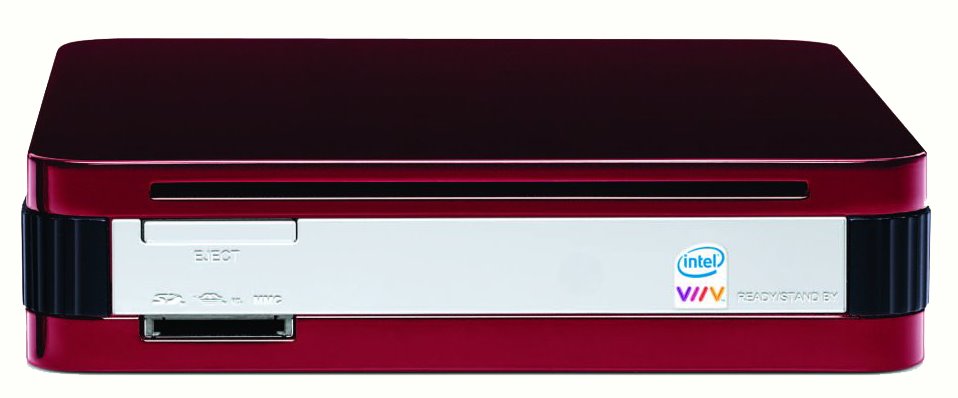
Intel announced the Intel® Core™ Processor Challenge at their Fall Intel Developer Forum, as a PC system design challenge which they hope will speed up the availability of small, stylish PCs for consumers' homes.

Eligible entries will be judged based on attributes of style, acoustics, functionality and features. Taken straight from their press release linked above, "Intel will award the Grand prize winner with up to US $300,000 for hard tooling costs of their winning design and US $400,000 for co-marketing activities with Intel promoting the design. The first place winner will receive up to $300,000 for hard tooling of their winning design."

I wonder if PC Alchemy will enter the contest? This is their stylish and small PC called the MiniMCE. I also like the stylish design of Apple's Mac mini, but I don't think it's eligible because even though it uses the Intel Core Duo processor, it's not a Intel® Viiv™ technology-based PC.

Let me know if you come across other potential entries. It will be fun to see if some creative designs help to launch some truly new and innovative companies.

Update - 9/27/06, here's a pic of another small form factor HTPC, which I think is from a German company, found after performing a Google image search:

Saturday, September 23, 2006

FLACs from Philadelphia Orchestra

The Lossless Audio Blog reported today that the Philadelphia Orchestra launched a new online music store and will be selling recordings of their concerts. The cool thing about this is, in addition to offering downloads in the popular MP3 file format, they will also offer them in the lossless FLAC (free lossless audio codec) format. Great news for classical music fans! Check it out.

Friday, September 22, 2006

What's the USE?

As an engineer, I have always focused on the functionality of a product with little attention left for the appearance. This is the old 'function determines form' attitude in spades.

It is easy to take the human out of the function equation, to define function in terms of a set of specifications that can be reduced to numbers. If you hit the numbers, the function is there; if you don't, it's back to the drawing board (or the unemployment office).

But a good design isn't just a set of numbers; the thing being designed is something that people will use. The starting point for a good design is an understanding of use. 'Use' is a slippery word - we ‘use’ it to mean different things and, in design, it can often morph into function - a thing is 'used' through the manipulation of its functionality. This is where engineers and designers can get sidetracked - use is defined in terms of function, cutting out the primary reason for the design - What is someone going to USE it for?

I would suggest that Amplio is trying to create a product (or system or component or whatever it is called) that enables people to enjoy their audio collections to the greatest possible degree. The key word here is enjoy - to give people all the sound that is possible - nothing less, nothing more.

When I am listening to music I don't want to be aware of the process that is bringing it to me, either through artifacts in the sound or by being aware of the equipment that is making my listening possible and I would guess that most other listeners would have similar needs.

Stating this another way, a good system will give me perfect fidelity while being completely invisible.

I can’t have this – perfect and invisible are out of human reach – but how do we get close?

That’s the challenge – I hope to look back in a few years and say we are very, very close.


Thursday, September 21, 2006

So, When Will It Ship?

I've been asked several times about the ship date for our product. I don't have an answer for that, but I can tell you about the changes or improvements we need to make to the current prototype before we are ready to ship a commercial product. In this post, I'll give a general overview of improvements needed for each of these subsystems:
  1. the chassis
  2. power supplies
  3. amplifier modules
  4. soundcard section
    a. computer interface
    b. drivers/software
    c. digital/analog section - DACs, ADC, etc.
I will provide more detailed information about each of these sections in future posts.

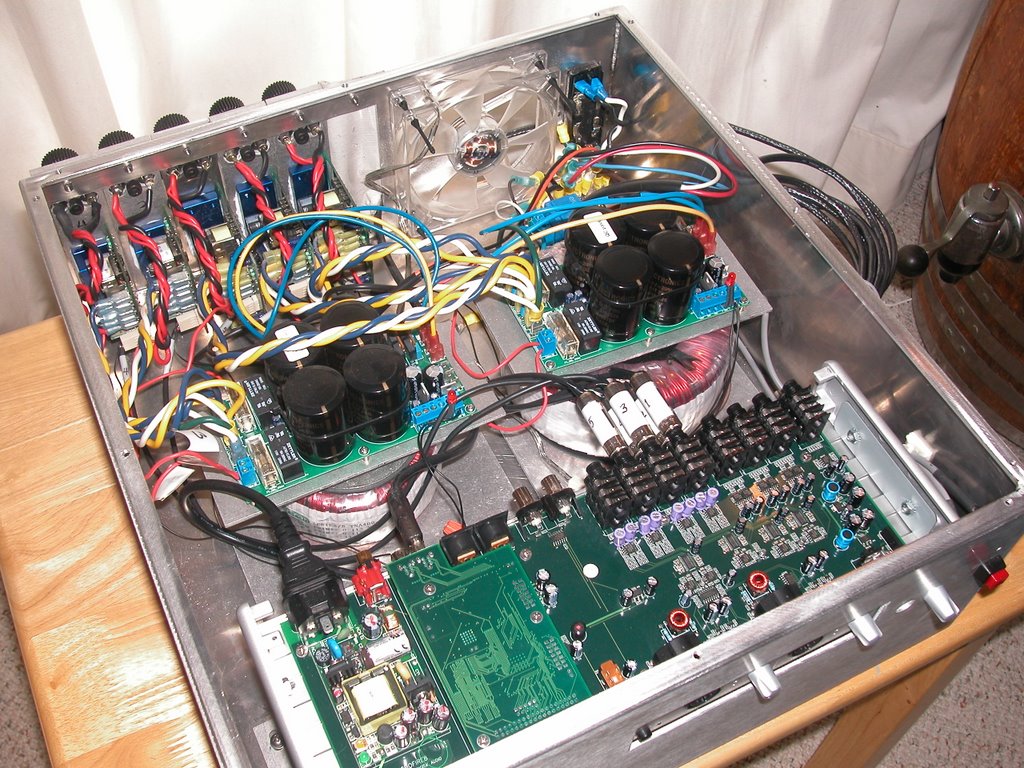
As you can see from the prototype photos, the current chassis is not something many people would want in their living or family rooms, unless they're really into the industrial design style. They actually might look kind of cool in an a loft space or something, but that is sooo 90's :). So we need to come up with a more aesthetically pleasing design. We would also like to minimize the size and weight, and allow for optimal heat dissipation. Fortunately, the internal components are relatively small and don't generate too much heat so we should be able to create a chassis that isn't a monster. We'd also really like to design a chassis that would let do-it-yourself (DIY) people build or upgrade their own systems. Much like you can do with PC today. This means the inside of the chassis would include the framing to mount things like power supplies, the printed circuit boards and amp modules. Ideally, the amp modules would simply slide into slots in the back of the chassis.

The main changes we plan to make with the power supplies for our commercial product will be to replace the linear power supplies with switch mode power supplies (SMPS). The latest SMPS technology designed for audio applications is very promising. Compared to general purpose SMPS, the SMPS designed for audio applications usually have much larger capacitors to provide a larger energy reserve for the faster and deeper current demands. General purpose SMPSs are typically designed for fairly constant loads, so they don't usually have large enough capacitance at the outputs for audio applications and adding capacitance to a general purpose SMPS wouldn't work very well because the feedback circuit doesn't take into account this additional capacitance and the added phase shift and oscillation would make it unstable. The main benefit with using the SMPS instead of the linear supplies is since they operate at a much higher frequency, they can be much smaller and lighter than the equivalently powered linear supplies we were using. Since a SMPS recharges its capacitors about 1000 times faster than the rate of a linear power supply, which needs a fairly large transformer and big capacitors to keep up with the current demand, the SMPS can get by with smaller capacitors.

We are pretty pleased with the amplifier modules in the conceptual prototype. The amp modules we've tested are from Hypex Electronics, a Dutch amplifier manufacturer who has developed a very good reputation for high quality products. There are a few things that can be done to optimize these for our application, which will be done if we decide to use their UcD amps in our commercial products. Since we started this business, we have discovered a few other class-D amplifier modules from other manufacturers worth considering. And there is also the possibility of developing our own class-D amp, but unlikely considering the development costs and time. To accommodate our modular chassis design, we would really like to find an amp module that will fit into a small enclosure. This enclosure would be similar to the case of a hard disk drive. It would protect the circuit components, dissipate heat and would allow for an easy method to insert the amp into the back panel of the chassis. If the sizes were standardized, you could upgrade or replace amp modules when newer, better designs were available by simply unplugging the old amp and replacing with the new. We would also be happy to support more than one amplifier manufacturer. Some of the class-D amp modules have a reputation for being very accurate and transparent to the source. These amps sound great, but if the source material isn't very good, like a poor recording, the flaws are pretty noticeable. Other class-D amp modules might be a little more forgiving of these types of recordings. I guess it all depends on your listening preferences. I think it would be nice to have a choice. Now, if only we can find a few manufacturers to work with us on a design for these standard amp cartridges. Wouldn't it be great to have the options of different amp modules just like you currently have with hard drives or video graphics cards?

The soundcard section is where we have the most work ahead of us. The current unit in our conceptual prototype was designed primarily for pro-audio applications - recording and mixing. There are quite a few components that aren't needed in a music playback or home theater system. For example, we don't need 8 balanced inputs if the audio source is the PC. The analog outputs of the pro-audio soundcards are good and usually sound better than your average A/V receiver, but they may not sound quite as good as the high-end dedicated preamp/processors. Their outputs are designed to be good enough for an audio engineer to monitor a mix, but might not meet the needs of someone that is really into critical listening. Our goal is to design a soundcard that sounds as good as some of the high-end dedicated prepros, but at a much lower cost. We've also got a lot of work to do on the software - both the drivers and the control panel applets for controlling things like volume, channel mixing, etc.

Like I said, we'll cover each of these areas in a little more detail in future posts. Please let me know what topics you would like to learn about first.

Wednesday, September 06, 2006

Prototype Photos

Here are some photos of our conceptual prototype:

←This is the front view. It shows the aluminum chassis (0.125" thick) and the controls for the soundcard section. I know it's kind of ugly, but it serves its purpose. This soundcard includes 2 Neutrik combo connectors (for both 1/4" TSR and XLR microphone inputs), a 48V phantom power switch, level controls and LED meters. There's also a basic momentary pushbutton for the amplifier modules on the far right.


→With the cover off, you can see the internal components. The soundcard is near the front (bottom of the pic), the toroids and power supplies are in the middle, and the amp modules are mounted on the back. The amps for the 3 front channels are rated at 400W into 4Ω loads, while the 2 rear channels use amps rated at 180W into 4Ω loads. Since these amps have different operating voltages, we needed 2 toroids and power supplies.

←This picture shows a rear view of the prototype. The amp modules are attached to 1-1/2"x6"x1/4" bars of aluminum, which serve as additional heat sinks. We are using Cardas patented binding posts for the speaker connections. We've also used a quiet (and slow) 120mm fan to pull heat out of the interior space. After testing, we've discovered that the amps run pretty cool and some of our efforts to dissipate heat might be overkill. A little over-engineering can't hurt.

Click on the pictures to get a larger view.

Tuesday, September 05, 2006

I Want Higher Quality Audio from the Online Music Stores

There's been a lot of news about online music services and gadgets that will compete with Apple's iTunes and iPod. Of course everyone's heard about Microsoft's Zune and complimentary music store (for those people who are truly obsessed with everything Zune, take a look at the ZuneInfo.com website or Microsoft's little teaser site). Does anyone know what will happen to the Urge music service that was suppose to be the end result of a collaboration between Microsoft and MTV? I don't think that will be the service tied to Zune, but maybe I'm wrong. There's also the new player coming from Samsung which will be teaming up with the music service MusicNet. And, now MySpace plans to start selling music from unsigned artists. There's also going to be free downloads from SpiralFrog, an advertisement supported alternative to the pay-per-song iTunes model.

I'm not sure what the benefits of the new music services are... Is it an alternative to Apple's proprietary formats and DRM? I haven't read anything about higher fidelity or the addition of album liner notes and high quality album art.

Here's what I'd like: at least CD quality - or losslessly compressed CD quality, with high quality CD cover art (500x500 pixel jpegs or better) along with the information normally included with the album's insert at a reasonable price. I think $.99/track is too high for lossy compressed audio, like iTune's 128 Mbps AAC files. Especially when you compare it to the price of CDs purchased from brick & mortar stores. Besides, I still like to buy the whole album and don't understand why some people purchase only single tracks. If the artist can't put together a full CD worth of good tracks, then I don't buy the CD.

But, there is some good news, or reason to be optimistic about where digital music services are headed. There are a couple of music services listed over in our 'Links' section worth checking out. Both offer high bitrate audio tracks. The first one on the list, Magnatune, isn't really a "music service" like iTunes. They are a new type of record label that sells albums or tracks directly to consumers. You can download albums or tracks from Magnatunes in WAV or lossless FLAC formats. Unfortunately, you are limited to just Magnatune's artists - all of which are very good. So obviously you can't purchase music from popular artists that are already signed with the major labels. The other one, MusicGiants is a competing music service that offers lossless WMA files instead of highly compressed AACs or MP3s. MusicGiants also offers music from all the major record labels. I've also heard MusicGiants will offer high resolution multichannel surround recordings later this month. Since I can't play either SACDs or DVD-Audio with my system, maybe the multichannel surround tracks from MusicGiants will be a great alternative, especially if they are 24bit/96KHz or better. Hopefully they will also include album art and liner notes.

I'd like to hear what other people would like to see/hear from online music services. What formats and bitrates are you willing to accept? Do you want album art and liner notes? What price are you willing to pay? Or, are you satisified with purchasing and ripping CDs (which is what I do mostly)? Please let me know if you hear any news about high quality/higher bitrate audio from other services.

Monday, September 04, 2006

Another Class D product...? Maybe an Apple amplifier...? Oh No!!!

A thread over on diyAudio forums discusses another Class D chip manufactured by Freescale Semiconductor. The first posting includes this link to their white paper (I've also added it to our 'Articles' section).

One of the posters speculates that Freescale will be partnering with Apple to produce a multichannel preamp/amp combo. Seems unlikely to me, but... you never know. There are so many Apple rumours flying around that it has all become just a bit of noise.

Friday, September 01, 2006

Do we really need another disc format for HD?

HD-DVD and Blu-Ray have a new rival -- New Medium Enterprises's High Definition Versatile Multilayer Disc. HD VMD makes use of a red laser and multiple layers to maximize storage capacity.

Check out this article:
Third format to enter high-definition DVD war.

And, here's the website for New Medium Enterprises, the company who's developing VMD.

I think the current battle between HD-DVD and Blu-Ray has created enough of a mess. Do we really need another format to add to the confusion??

Tuesday, August 29, 2006

Connecting to the HTPC

Today most computers communicate with external soundcards using a USB or FireWire connection. Other technologies that might become popular in the future include Audio over Ethernet (AoE) and some new varieties of FireWire like VersaPHY, S800BaseT and POF with IEEE 1394. Our conceptual prototype uses a FireWire connection, which works very well. However, we are looking very closely at other technologies to make sure we provide the best solution for our users.

I also know that some pro-audio external soundcards like M-Audio's Delta 66 and Delta 1010 or Echo Audio's Layla and Gina use a proprietary connection to a dedicated PCI adapter card. Both of these manufacturers are now using either USB or FireWire on all of their newer external soundcard products. We will not be using a proprietary PCI adapter card solution.

USB is the most common method used to connect peripherals to a computer. USB 1.1 was originally meant as a replacement for legacy ports, and a user-friendly, low-cost way to connect peripherals such as keyboards, mice, and printers to a PC. USB was never designed to handle intense multimedia data loads. USB 1.1 is limited to a data rate of only 12Mbits/sec, which is enough bandwidth for CD audio (1.4Mbits/sec). However, it might be difficult for USB 1.1 with it's associated overhead to handle multiple streams of CD audio or DVD-Audio (with 6 channels of 24 bit audio at a sample rate of 96KHz) which requires up to 8.6Mbits/sec. USB 2.0, which is backwards compatible with USB 1.1, provides the fastest data rate currently available at 480Mbits/sec. However, USB uses a host/client (or master/slave) architecture. The PC takes on the role as the host, which requires some overhead to handle all of the arbitration functions and dictate commands to the clients, thus reducing the overall data rates. Data rates are reduced more if addition communication between other clients is required. The maximum length of a USB cable is 5 meters, greater lengths require USB hubs.

Many of the manufacturers of pro-audio soundcards offer an external solution using FireWire (IEEE 1394). FireWire is based on a peer-to-peer technology where each "intelligent" peripheral communicates with each other to provide sustained data rates. Unlike USB, no additional PC overhead (system memory or CPU) is needed to sustain the data rates. FireWire includes support for memory-mapped devices, which allows high-level protocols to run without forcing numerous interrupts and buffer copy operations on host CPUs. The most common FireWire in use today, IEEE-1394a, provides data rates up to 400Mbits/sec with cable lengths limited to 4.5 meters, but up to 16 cables can be daisy chained using an active repeater, external hub or internal hubs included in many FireWire devices. The maximum length possible with any configuration of IEEE-1394a is 72 meters. A newer FireWire standard, IEEE-1394b (sometimes called FireWire-800) provides a data rate of 800Mbits/sec (but promises to support speeds of 1600Mbits/sec. to 3200Mbits/sec. in the future) and cable lengths of 100 meters when using optical fiber or CAT5 cabling. However, if you read the fine print, these longer lengths only support data rates of 100Mbits/sec when using CAT5 cabling. A future version of FireWire, p1394c is suppose to provide data rates of 800Mbits/sec for cable lengths of 100 meters.

Theoretically USB 2.0 should be faster than FireWire IEEE 1394a. Each FireWire device has to negotiate for bus access and the FireWire bus must wait until a given signal has been sent to all devices on the bus. The more devices on the bus the lower the performance. While USB is only limited by the host-client branch, not the whole network. USB's host-client technology also allows the host to allocate more bandwidth to higher priority devices. Even though the USB 2.0 spec of 480Mbits/sec is higher than FireWire's (IEEE 1394a) 400Mbits/sec, the increased CPU and host overhead due to the host/client technology of USB 2.0 reduces its sustained throughput to rates lower than those of IEEE 1394a. USB comes standard on over 90% of computers shipped today (probably more than 90%, now). Unfortunately, FireWire does not come standard with most new PCs. However, I've noticed that it is included on many of the motherboards that are popular with people who build their own HTPCs. Anyhow, both FireWire and USB 2.0 can handle the audio throughput needs of an external soundcard.

Looking into the future, it appears that the performance of USB isn't really going to change much. The only references to a future version of USB talk about wireless USB (WUSB). Wireless USB sounds interesting. You'll get USB 2.0 performance within a range of 3 meters. Between 3 and 10 meters, WUSB can operate at 110Mbit/sec. The future versions of FireWire are even more interesting. I'm not sure exactly what the bandwidth requirements will be for future audio formats like HD-DVD and Blu-Ray (probably, not much more than DVD-Audio's 8.6Mbit/sec, but you never know). And who knows, maybe there will be something better after these two formats kill each other off. Anyhow, the speed improvements of future versions of FireWire might be very useful. What's even more exciting is the fact that the cable lengths will let us support features like whole-house multi-zone audio much easier. With S800BaseT maybe we will be able to have an HTPC in the family room with our soundcard/amp, and others in the kitchen or dining area and bedrooms. All of the PCs are connected via FireWire to either multichannel soundcard/amps or stereo soundcard/amps. They are also connected to each other over the S800BaseT network. Because of the network connection, any of the PCs will be able to recognise all of the other soundcard/amps on the network. That is, your PC will actually have every soundcard on the network in its list of audio devices. With the appropriate software, like J.Rivers Media Center, they'll be able to set up multiple zones. From any one of the PCs you'll be able to pipe music all over the house. For parties, the same tune can play in every zone. However, you will still be able to control each soundcard from the local PC. Hopefully the software will be able to manage when the soundcard is under local control or is available across the network. Anyhow, the possibilities are very exciting since you should be able to connect all FireWire devices up to distances of 100 meters and still maintain S800 (800Mbits/sec) speeds.

After reading several articles or papers describing Audio over Ethernet, I'm not sure if it will ever come into the mainstream. First, there are a lot of proprietary solutions and without a standard, it's unlikely to move beyond its niche. The technology is really geared to professional applications like auditoriums or large recording studios. Second, if S800BaseT takes off, it looks like there will be no need for audio over Ethernet. Anyhow, it is another technology that we will keep an eye on.

I'm sure some people reading this post are wondering why I haven't included HDMI in this discussion. It's because I don't think HDMI (High Definition Multimedia Interface) will ever replace USB or FireWire as a way to connect to external soundcards. Instead, it will probably replace S/PDIF because it is also basically just a one way connection. It is a much higher bandwidth digital connection. Instead of the S/PDIF limits of 2 channel PCM or multichannel Dolby Digital or DTS compressed audio, HDMI can handle 8 channels of uncompressed audio (in addition to all of the HD video). We are considering using an HDMI input instead of/or in addition to S/PDIF as our digital input option. We are already beginning to see HDMI connectors on graphics cards, high resolution displays and A/V receivers. In the next few months HDMI connectors will be included on new motherboards. Another big part of HDMI is content protection and HDCP, but I don't really want to cover that in this blog entry. Maybe some other time.
Powered By Blogger